GTARP Properties — Feature Showcase
GTARP Properties is a complete property system built for immersive roleplay, giving players, factions, gangs, businesses and staff a full way to create, own, rent, manage, furnish, secure and interact with properties across the server.The system supports personal housing, rental apartments, business interiors, faction properties, gang properties, custom interiors, elevators, furniture, mailboxes, storage, security, access management and full integration with the GTARP Business system.
Property Types
GTARP Properties supports multiple property use cases.Residential Properties
Residential properties are houses, apartments or private interiors that players can purchase, rent or receive access to.Players can own residential properties personally, receive keys, give access to others, manage tenants, decorate the interior and use property features such as storage, mailboxes and security cameras.
Business Properties
Business properties are interiors designed for shops, companies or commercial roleplay.These properties can be linked directly with the GTARP Business system. This allows the property interior to become the physical location of a business while still using the property system for doors, interiors, furniture, mailboxes and ownership syncing.
Business employees can receive access through the linked business system, and business ranks can control permissions such as furniture, mailbox and stash access.
Faction Properties
Properties can be owned by a job or faction. When a property is owned by a faction, members of that faction can access it based on the property configuration.Faction properties are useful for departments, organizations, offices, stations or shared roleplay spaces.
Gang Properties
Properties can also be owned by gangs.Gang-owned properties use QBCore gang data. Gang bosses can purchase properties for their gang, and members of that gang can access the property based on the system configuration.
Property Ownership
Properties can be owned in several ways depending on how they are configured.Players can buy properties personally, and the property will be linked to their character.
Properties can also be purchased for a job/faction by a job boss. When faction funds are used, the purchase is paid from the job management funds and logged in management logs.
Gang bosses can also purchase properties for their gang using personal funds.
Ownership types include:
- Personal ownership
- Rental ownership
- Job/faction ownership
- Gang ownership
- Business-linked ownership
Renting System
GTARP Properties supports two rental styles.Owner-Based Renting
For normal owned properties and business properties, players can rent from the property owner. In this setup, rent is linked to the owner and works as a traditional tenancy system.The property owner can manage tenants through the property manager menu.
Apartment-Style Renting
Properties with sale_type = rent can work like apartment or motel systems.Multiple players can rent the same property, but every renter receives their own private instance. This means several players can rent the same motel room or apartment type without seeing each other inside.
Each renter has their own routing bucket/dimension, creating a private version of that interior.
If a player already rents that property, their entrance menu changes to:
- Enter Own Property
- Stop Rent
- Request Invite
This creates an apartment-style system similar to shared apartment buildings or motel rooms.
Routing Buckets and Interior Instances
Every owned property interior uses its own routing bucket/dimension.For normal properties, the property ID is used as the routing bucket. This prevents players in different properties with the same shell from seeing each other or seeing markers from other properties.
For apartment-style rentals, each renter gets their own rental instance bucket. This allows multiple players to rent the same property while still having separate interiors.
This also fixes issues where business markers, furniture, elevators or interior points from one property could appear inside another property using the same shell.
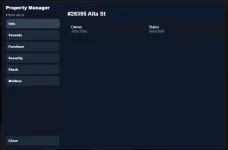
Property Manager
Owners can use the property manager menu from inside their property.The manager includes options such as:
- Property information
- Keys management
- Tenant management
- Storage access
- Mailbox access
- Furniture menu
- Security and cameras
- Business integration menu for business properties
Business properties use the linked business system for employees and rank permissions.
Keys and Access
The system supports key-based access.Players with keys can see the property blip if they are allowed to access the property and can interact with the property based on their permissions.
The property manager includes a Keys tab where keys can be viewed, given or removed using in-game modals.
For business properties, employees from the linked business can receive door and property access through their business role permissions.
Door Locking
Properties have their own door lock system.The door state is synced and visible at the entrance and inside the interior.
The current access logic is simple and roleplay-friendly:
- If the property is unlocked, anyone can enter from outside.
- If the property is locked, nobody can enter from outside.
- Players inside can always leave, even if the property is locked.
Inside the property, the door status is also shown so players can see whether the door is locked or unlocked before leaving.
On-duty admins can lock or unlock properties with the correct admin controls.
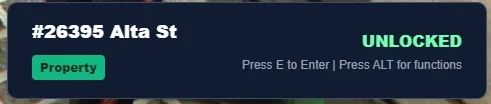
Property Entrance Card
When standing near a property entrance, a clean interaction card appears showing property information such as:- Property name
- Address
- Property type
- Lock status
- Business name if linked to a business
- Available interaction options
Property Blips
Public sale and rent blips are removed.Players only see property blips they are supposed to see.
Blip visibility is based on access:
- Personal owner
- Renter
- Keyholder
- Business access
- Job/faction ownership
- Gang ownership
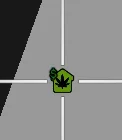
- Green house blip: personal property, rented property or key access to a residential property.
- Yellow/orange house blip: business property access.
- Blue house blip: job/faction property.
- Red house blip: gang property.
- White/fallback: used only when a specific color is unavailable.
Interior Preview
Players can preview interiors before buying or renting a property.The preview system loads the selected interior and allows the player to inspect it before making a decision.
Admins can also preview interiors when creating or editing properties, making it easier to select the correct shell or interior.
The preview system supports the combined interior list, including standard interiors, PS-Housing shells, online interiors and bob74_ipl interiors.
Interior Selection
Admins can select interiors when creating a property and can also edit the interior later from the property admin menu.The interior selection system includes:
- Standard interiors
- Existing property shells
- PS-Housing shells
- Online interiors
- bob74_ipl interiors
- Custom interiors
This means admins do not need to choose separate categories for PS-Housing or online interiors. They are all available inside the same interior selector.
Custom Interior
Admins and the Map Team can use custom interiors through the Custom Interior option.Custom interiors are loaded from the shellbuilder system using server-side shell data. The menu shows available custom shells by name, allowing staff to select the correct shell from an in-game modal.
This makes it possible to use custom-made interiors without manually adding every shell to the standard interior list.
Interior Loading and Recovery
GTARP Properties includes loading protection to prevent players from falling through the map when entering an interior.When a player enters a property:
- The screen fades out.
- The player is temporarily frozen.
- The shell/interior is loaded.
- Collision is requested and checked.
- The player is placed safely inside.
- The screen fades back in once the interior is ready.
The system also has fall protection. If a player falls below the shell/interior, they are moved back to the inside door position.
Admin Interior Tools
Admins have tools to manage and fix property positions.Available tools include:
- Move the outside property entrance.
- Move the inside door/exit position.
- Edit the property interior.
- Select a new custom interior.
- Suspend or delete properties with confirmation.
- Manage elevators.
- Teleport to property locations from the admin menu.
Elevators and Teleports
GTARP Properties includes an elevator/teleport system.Admins can create two-point elevators using commands. Once both points are set, players can use the elevator by standing on the marker and pressing E.
Elevators support multiple modes:
- Player Only
- Player & Vehicles
- Vehicle Only
World/admin elevators can also be created outside interiors. These can be locked/unlocked and have their mode changed by admins.
Elevator markers, marker type, size and colors can be configured.
The elevator admin menu includes:
- Search by ID
- Search by property name
- Teleport button
- Delete button
Furniture System
The furniture system allows players to decorate their properties with furniture categories and placement controls.Players can place, rotate and position furniture inside their property. Furniture is saved to the database and loaded again when the player enters.
Furniture access can be controlled by ownership, keys or business employee permissions.
Mailbox System
Each property can have a mailbox at the entrance.Players can place items into the mailbox, while only players with proper access can remove items.
For business properties, mailbox access can be controlled through business employee rank permissions.
Mailboxes can be used for letters, parcels, deliveries and other roleplay interactions.
Storage System
Properties support storage through the inventory system.Depending on the property type and permissions, players can access:
- Property stash
- Business storage
- Mailbox storage
- Fridge or extra storage where configured
Security and Cameras
Owners can purchase and place security cameras around their property.Cameras are managed through the property manager menu and add extra roleplay and security options for residential and business properties.
Police Breaching
LEO jobs can use a battering ram item to force open property doors when needed for roleplay situations.This allows law enforcement to interact with properties in a realistic way without requiring manual admin intervention.
Business System Integration
GTARP Properties integrates directly with the GTARP Business system for business-type properties.When a business location is placed inside a property interior, the business system keeps the marker tied to the correct property bucket. This means business markers inside one property do not appear inside another property using the same shell.
Once linked:
- The business is connected to the property.
- The property owner can sync with the business owner.
- The owner can receive the owner role in the business system.
- Business employees can receive door access.
- Business employee ranks can control mailbox, furniture and stash permissions.
- Shop and employee interaction points remain inside the interior.
- Business markers only appear inside the correct property instance.
- Ownership changes can sync between the property and the business.
Business properties do not use the normal tenant system. Access is handled through business ownership, employees and rank permissions.
Business Deliveries and Property Entrances
Business stock deliveries are also compatible with property-based businesses.If a business is inside a property, delivery coordinates can point to the outside property entrance instead of the shop marker inside the interior.
This allows truckers or delivery jobs to deliver stock to the exterior entrance while the actual business remains inside the property.
Partial stock deliveries are supported, meaning a delivery can bring only part of an order and the remaining amount can be delivered later.
Summary
GTARP Properties is designed to support both personal housing and business interiors in one complete system.It combines ownership, renting, keys, furniture, storage, mailboxes, security, admin tools, shell support, custom interiors, elevators, routing buckets, faction ownership, gang ownership and business integration into a single roleplay-focused property resource.
The result is a flexible property system that supports private homes, apartments, motel rooms, faction spaces, gang hideouts, shops, companies and business interiors while keeping everything synced, secure and manageable for players and staff, and due to our in-game shell creator a complete interior can be made from scratch in a couple minutes and is permanently live immediatly.